Meraki integration
Easily integrate your Meraki account with Fuzion.
by Fuzion team2 min read
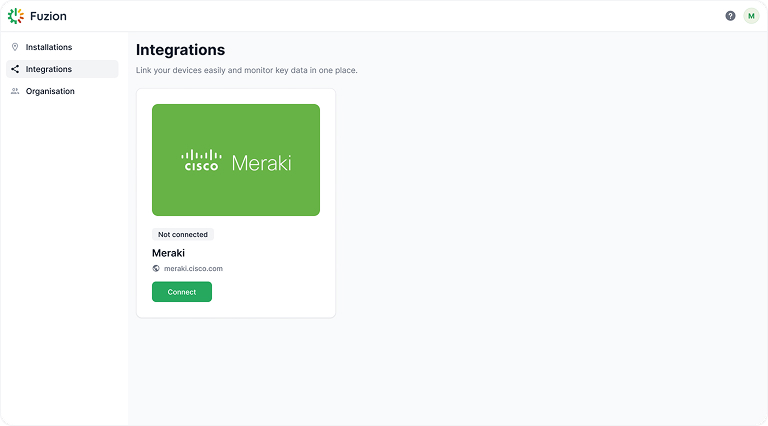
1. Access your Fuzion Self Service Portal
- a.Log in to the Fuzion Self-Service Portal and navigate to "Integrations"
- b.Click "Connect" to open the integration page.
2. Enter Your Meraki API Key
2.1 How to locate your Meraki API Key
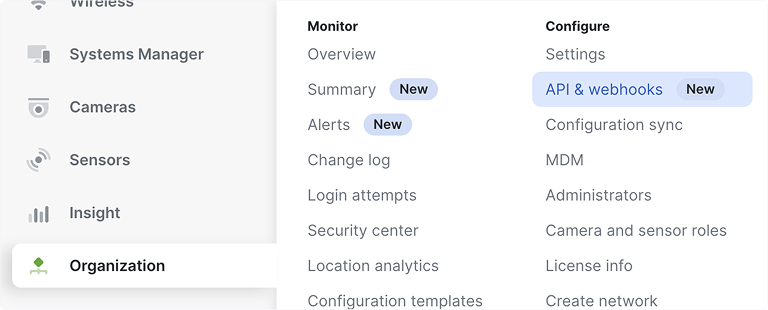
- a.Log in to your Cisco Meraki Dashboard
- b.Navigate to Organization > API & Webhooks
- c.Generate API key
- d.For detailed instructions, visit Cisco Meraki Dashboard API
2.2 Enter the API key in Fuzion Self Service Portal
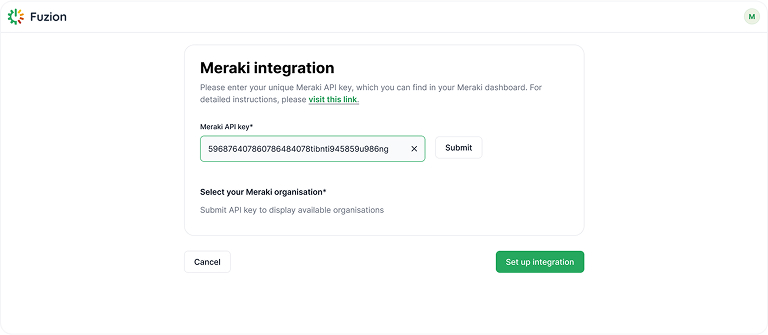
- a.Paste the API key into the "Meraki API Key" field
- b.Click "Submit" to validate the key
- c.If multiple Meraki Organizations are available, select the desired one (optional)
- d.Click on "Set up integration"
- e.Verify that Meraki is successfully connected to your Fuzion Organization
Still need help?
mailsupport@fuzion.tech